Action Menu
Menu Options
To see the action menu for a wire/connection, right click on any wire and the menu should display.
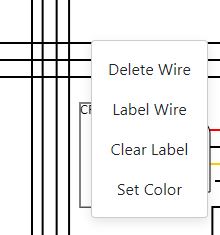
Delete Wire
Selecting Delete Wire will delete it from the drawing.
Label Wire
Selecting Label Wire will allow you to specify a text label that is rendered along the wire in 2 different places,
automatically adjusting to fit the wire geometry.

Clear Label
Removes any labels from the selected wire.
Set Color
Allows you to specify a single solid, or striped/two colors for the wire.